EP3. Installing Cocrates Harness
In Ep2 we declared a powerful principle:
"The unexamined code is not worth generating." Output that hasn't been reviewed isn't worth creating.
The principle is clear. Everything AI makes must pass review (U→A→E→A), and you must not leave ignorance unattended.
But one practical question remains:
"I get the principle. How do I actually start?"
Today we answer that. Install takes about five minutes. But remember—the real start is after install.
🎭 What Cocrates Harness Actually Is
First, let's be clear about what Cocrates Harness is.
Cocrates Harness isn't a standalone program. It's a plugin that runs on a platform called opencode.
Think of it this way: opencode is the stage; Cocrates Harness is the actor on that stage. No stage, no place for the actor to stand.
So Cocrates setup has three steps:
One, install opencode. Two, configure the Cocrates plugin. Three, prepare the skill files.
Remember those three. Setup is simpler than you think.
🖥️ Three UI Options
There are three ways to use opencode. Pick what fits your environment.
1) opencode Terminal (TUI)
Keyboard-centric use in the terminal. Good if you're comfortable with CLI.
2) opencode Desktop (Beta)
Installed GUI app. Still beta—features and stability may be rough.
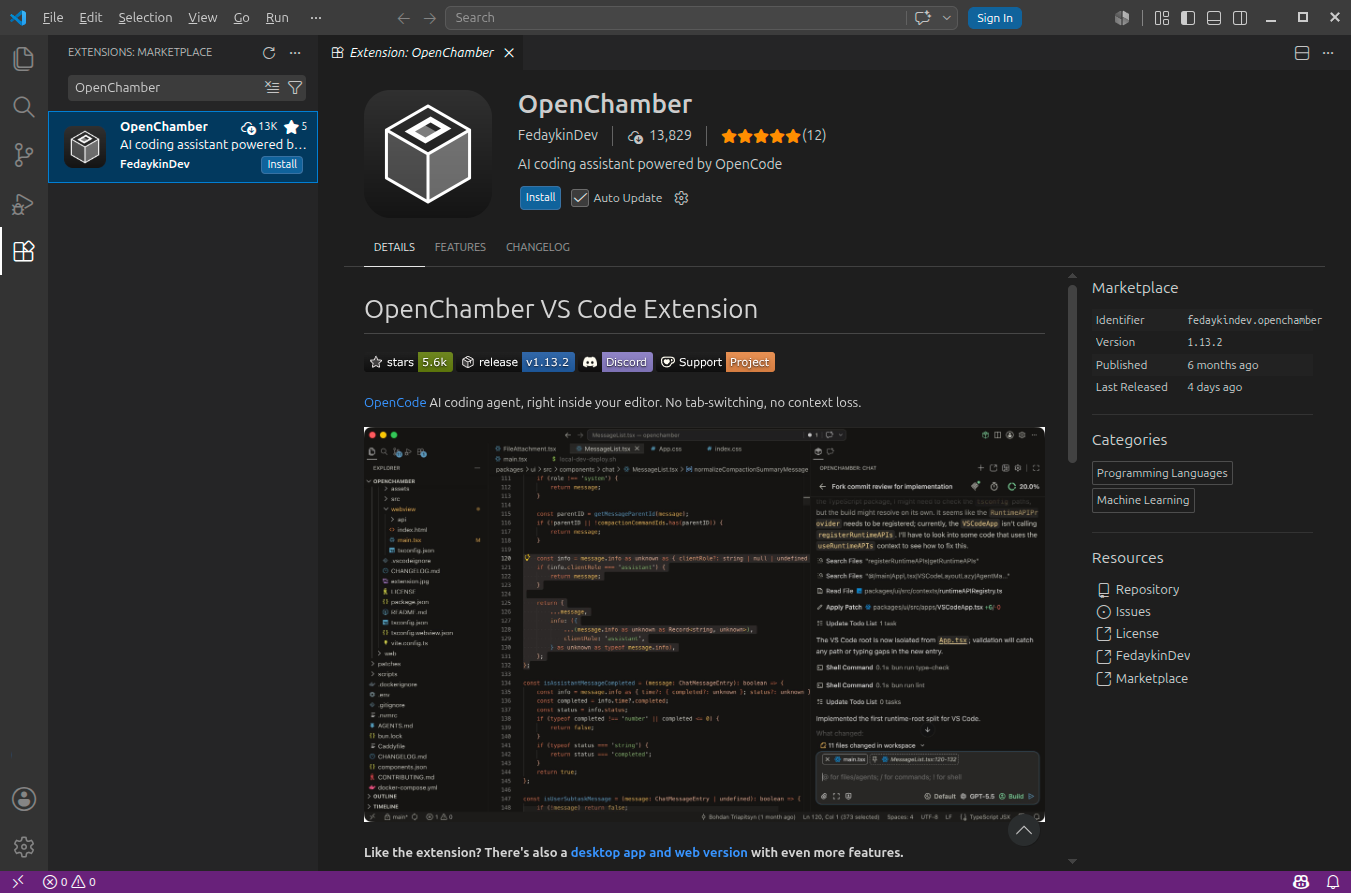
3) VS Code or Cursor + OpenChamber Extension ⭐ (Recommended)
If you know VS Code or Cursor, you can use Cocrates as naturally as Copilot or Cursor. Note: VS Code + OpenChamber still requires opencode installed.
⚙️ Step 1 — Install opencode
macOS / Linux
Open a terminal and run one line:
curl -fsSL https://opencode.ai/install | bash
curl downloads the install script safely; bash runs it. The opencode binary installs automatically.
When it's done, verify:
opencode --version
If a version prints, you're good. If you see "command not found", add ~/.local/bin to your PATH.
Windows
Windows has curl built in, but not bash by default. Use Chocolatey, a Windows package manager.
Open PowerShell as Administrator and install Chocolatey:
Set-ExecutionPolicy Bypass -Scope Process -Force; [System.Net.ServicePointManager]::SecurityProtocol = [System.Net.ServicePointManager]::SecurityProtocol -bor 3072; iex ((New-Object System.Net.WebClient).DownloadString('https://chocolatey.org/install.ps1'))
With Chocolatey installed, opencode is one line:
choco install opencode
Then check with opencode --version.
VS Code + OpenChamber Extension
opencode CLI is done. If the terminal UI feels awkward, install VS Code + the OpenChamber extension.
- If you don't have VS Code, download from code.visualstudio.com and install.
- Open VS Code, click Extensions (Ctrl+Shift+X), search "OpenChamber", and install.
With OpenChamber, you can use Cocrates inside VS Code like Copilot or Cursor.
🔧 Step 2-3 — Plugin Config + Skill Files
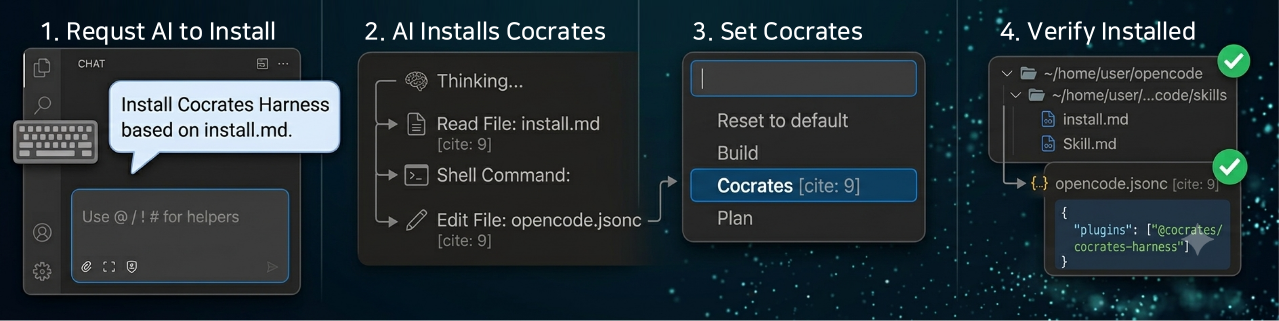
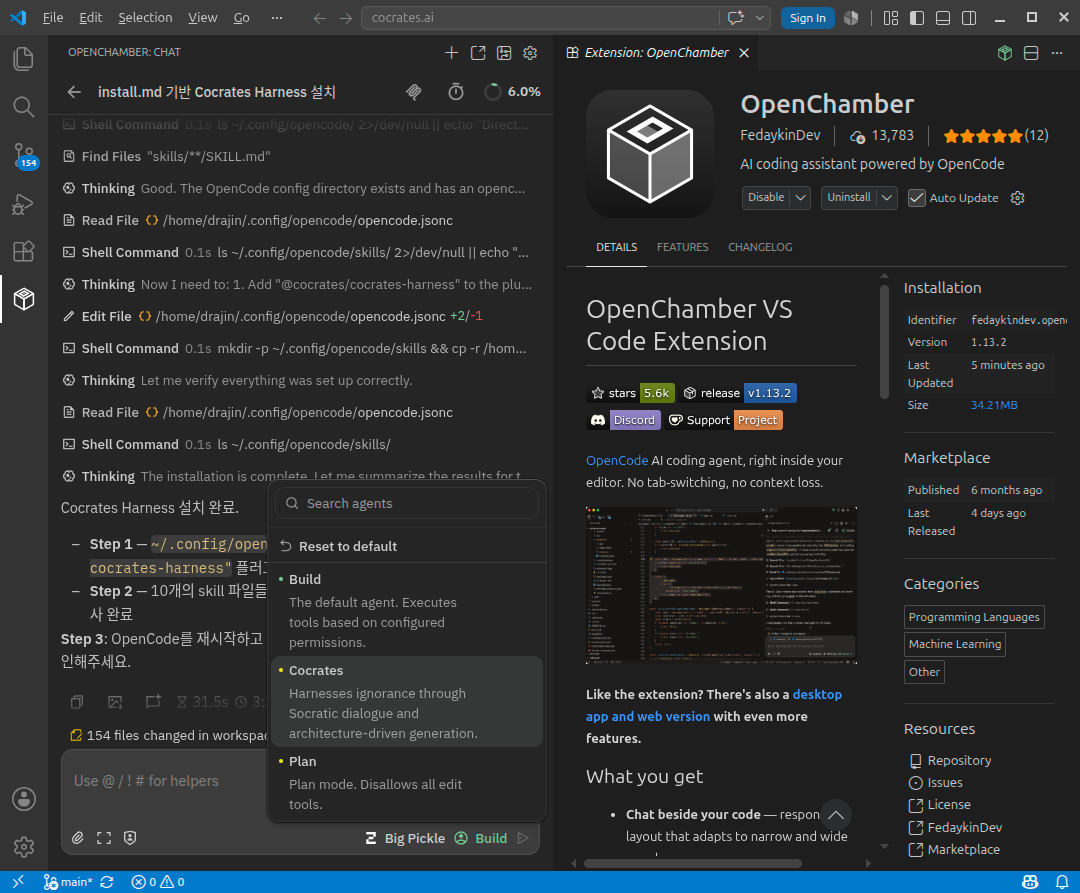
After opencode is installed, the easiest path is to ask AI to install Cocrates Harness.
Run Cocrates and request:
"Install Cocrates Harness based on https://cocrates.ai/install.md."
AI will handle it—download skills from the GitHub repo, add plugin config to opencode.jsonc, and finish setup.
If Cocrates Harness is already installed, you can repeat the same request. AI treats it as an upgrade following install.md.
- Plugin: Compares the installed version with the latest. Updates when a newer version is available and reports the old and new version numbers. If already up to date, it tells you so.
- Skill: Compares each skill between the official repository and your local files. Skips identical skills; when differences exist, shows a summary of changes and asks whether to replace with the official version or keep your local copy.
You do not need a separate "upgrade" command—just request installation as usual.
But. That's not the end.
If AI installed it and you move on without looking—that's still AI-assisted. Reviewing and approving what AI installed—that's the AI-native engineer.
Verify Installation
Cocrates Harness has two parts: Plugin and Skill. Check both to confirm setup.
Plugin check. Open ~/.config/opencode/opencode.jsonc. Is "plugin": ["@cocrates/cocrates-harness"] there? If yes, pass.
Skill check. Open ~/.config/opencode/skills/. Are there skill files like adr-writing, spec-writing, education, etc.? If yes, pass.
Those two checks are enough. If AI did it right, you verify and approve.
If both look good, restart opencode and select the Cocrates Agent. You're active.
🦉 First Conversation — The Real Part Starts Now
Install complete! You're ready. Time to experience the real thing.
Ask Cocrates your first question:
"Tell me about Bloom's Taxonomy."
One heads-up: Cocrates won't behave like a typical AI.
Most AIs dump a long explanation. Cocrates won't. It'll slip in subtly flawed examples and hand you your first mission.
Install isn't the finish. The real part starts now.
📌 Key Takeaways
- Cocrates is an opencode plugin. It runs on opencode and consists of Plugin + Skill.
- Recommended setup: opencode + VS Code + OpenChamber. GUI use of Cocrates in VS Code.
- Ask AI to install, then verify. One line: "Install based on install.md." The same request also upgrades an existing installation. After install or upgrade, confirm Plugin and Skill are in place. Build the habit of checking and reviewing AI's work.
Ask yourself:
- Is opencode installed?
- Is the Cocrates Agent active?
- Are you ready to ask your first question?
If all three are yes, you've already taken the first step as an AI-native engineer.
🎬 Coming Up Next
Today we prepared the tool. We installed Cocrates Harness, checked Plugin and Skill, and got ready for the first question.
But knowing principles and practicing them differ. Having a tool and using it differ too.
Next, Ep4: your first real conversation with Cocrates.
When you ask "Tell me about Bloom's Taxonomy," how does Cocrates respond? We'll walk through the three-step learning pipeline—Education → Knowledge Capture → Reflection—with real dialogue.
Your first meeting with thought-provoking AI. Worth looking forward to.
This series introduces the Cocrates Harness framework. Cocrates is an agent harness designed for Socratic dialogue so users keep agency and grow.